


Legion Workforce Engagement
4.73.97K Reviews
App Specs
- Version
- 3.7.5
- Updated On
- License
- Free
- Downloads
- 1,000,000+
- Developer
- Legion Technologies
- Categories
- Business
- Platform
- Android, iOS
Screenshots
 Analysis by AppCompare
When a shift changes at the last minute, a workforce app is only useful if the people who need the update can actually reach it. That is the practical question I keep in mind with Legion Workforce Engagement: it is a business app from Legion Technologies for teams coordinating work, but its value depends on how well it fits the routines and connection conditions of both managers and employees.
I would treat it as a shared workplace tool rather than a standalone answer to every staffing problem. It brings scheduling and team communication into a mobile setting, which can reduce the need to chase details across separate channels. At the same time, a phone app cannot make a confusing schedule clear by itself or guarantee that a message reaches someone who is not connected. The best results come when the team agrees on how and when to use it.
When the network is part of the workflow
Scheduling and communication are most useful when the information is current. If a manager changes a shift or sends a timely update, employees need a reliable connection to see the latest details. I would therefore check the app somewhere with steady service before relying on it for a time-sensitive decision, especially when commuting, moving between buildings, or working in a location with patchy coverage.
That does not make the app impractical; it simply makes connectivity part of the workflow. For a quick check at home or during a break, the phone format is convenient. For a consequential change, I would confirm that the intended person has received and understood it rather than assuming that sending a message is the same as completing communication.
Mobile use across a working day
A phone can be a more natural fit than a desktop for employees who are away from a workstation. Checking a shift or reading a team update in a break room takes less effort than signing into a separate computer. Managers can also use a mobile interface to keep track of team activity without being tied to a desk all day.
The trade-off is that a small screen is not ideal for every management task. A quick review works well on mobile, but a manager comparing many staffing details may prefer a larger screen if one is available. I see the app as a useful way to stay connected to everyday work, not as a reason to force every detailed planning task onto a phone.
What to do when something goes wrong
If a schedule or message does not appear as expected, I would start with the simple checks: make sure the phone has a connection, reopen the app, and look again before acting on an older view. If the problem continues, the in-app help resources are a sensible next step. For an urgent shift issue, a team should also have a clear backup contact method, since a mobile app should not be the only route for resolving a time-critical problem.
Worth Reading Before You Choose

EA SPORTS FC Mobile 26 Is a Bigger Football Game, but It Takes Time

Flipboard Shows What News Apps Must Do Beyond the Feed

Switching to Android Auto Means Rethinking Your Driving Routine

Google Calendar Makes a Crowded Week Easier to Manage

Ludo King Makes the Most of the Minutes Between Plans

Baby Panda World Brings Quick Play to Modern Phones, but Its Game Library Feels Busy
This is where managers can prevent avoidable confusion. Agreeing on who sends schedule changes, where employees should look for them, and how to confirm an urgent update makes the app more effective. It also keeps routine messages from being mistaken for a formal change that needs acknowledgment.
Keeping mobile use practical
Because this is a workplace app, employees and managers should be clear about which tasks belong in it and which details should be handled elsewhere. I would avoid sending unnecessary personal information in team communication and would encourage employees to check work updates at sensible times instead of feeling they must watch their phones constantly. Clear expectations make a mobile tool less intrusive and easier to use consistently.
Legion Workforce Engagement is free and is rated for Everyone. It has a 4.7 average from around 14,000 ratings, and more than a million installs. Those figures suggest that it has reached a broad audience, though they cannot tell you whether its setup suits a particular employer. The current version is 3.6.3, and the app first appeared on February 22, 2017; it requires Android 9 or later.
Where it fits among workforce tools
Compared with the familiar mix of spreadsheets, group chats, and email, the appeal here is having workforce activity and team communication in a purpose-built mobile app. That can make everyday coordination easier to follow than a schedule buried in a spreadsheet or an important change lost in a long chat. It is not automatically better for every organization: a small team with simple shifts may find a shared calendar and its existing chat perfectly adequate, while a larger operation may need management tools beyond what employees use on their phones.
First Impressions and Interface
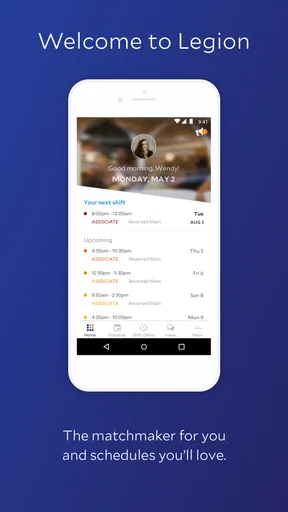
When I first opened Legion Workforce Engagement, I was met with a clean and intuitive interface. It’s like they knew I didn’t want to spend hours figuring out where everything was. The color scheme is easy on the eyes, and navigating through the menus feels smooth and seamless.
What really caught my attention was the dashboard. It’s packed with features, but somehow, it doesn’t feel overwhelming. Just a quick glance, and you’re up to speed with all your team’s activities. Pretty neat, right?
Features That Stand Out
Now, let’s talk features. This app is like the Swiss Army knife of workforce management. From scheduling to real-time communication, it’s got it all.
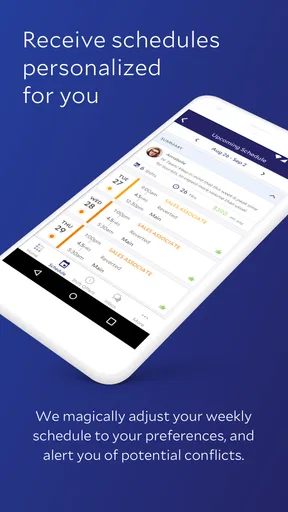
- Smart Scheduling: This is a game-changer. The app uses AI to predict scheduling needs. It’s like having a personal assistant that never sleeps. You can easily manage shifts and ensure there’s always someone available when you need them.
- Real-Time Communication: Say goodbye to endless email threads. With its built-in messaging system, you can communicate with your team instantly. It’s super handy for last-minute changes or quick updates.
- Employee Engagement: Keeping the team motivated is crucial. The app includes features for feedback and recognition, which helps in boosting morale.
These features are designed to make life easier for both managers and employees. It’s like they thought of everything!
Getting Started
Setting up the app was surprisingly painless. After downloading it from the App Store, I was up and running in no time. The onboarding process is straightforward, with helpful tips popping up as you navigate through the app.
One thing to note is that the app does require some permissions to function optimally. But hey, it’s all for a good cause, right?
User Experience
Okay, let’s talk about usability. I’ve used a fair share of workforce management apps, and I must say, this one is pretty user-friendly. The learning curve is minimal, which is great because who has time to read a manual these days?
What I appreciated most was the support feature. Got a question? Just tap on the help icon, and you’ll find a wealth of resources at your fingertips. It’s like having a tech support team living inside your phone.
Performance and Reliability
Performance-wise, the app is a solid performer. I didn’t experience any crashes or lag, even when I was juggling multiple tasks. It’s reliable, and I think that’s crucial when you’re dealing with important stuff like workforce management.
Updates roll out regularly, ensuring that any bugs are squashed promptly. It’s clear they’re committed to making this app better and better.
Final Thoughts
So, is Legion Workforce Engagement worth your time? I’d say absolutely! Whether you’re managing a small team or a large workforce, this app offers tools that simplify your job and enhance productivity.
In a world where efficiency is key, having an app like this in your toolkit is a no-brainer. It’s smart, reliable, and incredibly useful. Give it a whirl, and see how it transforms your work life. You might just wonder how you ever managed without it!
Making it work for different teams
I think the strongest fit is an organization where shifts change often enough that employees need a dependable place to check their work information, and where managers want fewer disconnected conversations. A retail or service team, for example, might use a routine of checking the schedule before a shift, then using team communication for a practical update. The benefit is less about adding another screen to everyone’s day and more about giving the team a shared place to return to.
For a manager, a useful habit is to separate planning from urgent communication. Use the scheduling workflow to make the shift plan coherent, then keep messages focused on the change or action employees need to know. That reduces the chance that a quick note becomes the only record of a schedule adjustment. Employees, in turn, can build a simple check-in habit around the start of a workday rather than repeatedly opening the app for no reason.
A realistic day might begin with an employee checking the day’s shift before leaving home. If a manager later posts a change, that employee can review it during a break and clarify anything ambiguous through the team’s agreed communication process. This is a sensible use of mobile access, but it depends on people having time to check and a connection when they do. For a role where workers cannot use phones during a shift, managers should plan around that restriction instead of expecting instant responses.
Setup, access, and expectations
One question people often have is whether installing the app alone is enough to start using it. In practice, a workforce tool needs to be part of an employer’s process: the organization has to establish how employees access the relevant team information and what they are expected to do in the app. I would ask a manager or workplace administrator about access before treating a download as a complete setup. That avoids the frustration of installing a tool without knowing how the employer intends to use it.
Another useful question is whether this should replace every existing communication channel. I would not assume so. A team can use the app for routine workforce coordination while keeping an established backup method for urgent issues or situations where a phone is unavailable. The key is to make the boundary explicit: employees should know which channel carries the current schedule and what to do if they cannot check it.
It is also worth agreeing on notification habits. A manager who sends too many low-priority updates can make important ones easier to overlook, while an employee who silences everything may miss a meaningful change. I would keep messages concise, label the action clearly in ordinary language, and avoid relying on vague notes that require a follow-up conversation to understand. This is a team practice rather than a special feature, but it has a direct effect on whether mobile communication feels useful.
Limits worth considering before adopting it
Legion Workforce Engagement is not the right answer for every workplace. If a team rarely changes shifts, already has a simple and trusted scheduling method, and communicates effectively through its existing tools, adding a separate app may create more routine than value. Likewise, a manager who needs to inspect complex staffing plans may find a phone convenient for quick checks but not the best place for detailed review.
Connectivity can also create an uneven experience. Employees may have different access to reliable mobile service during commutes or at work, and some may not be able to look at a phone while on duty. A manager should not interpret a delayed response as lack of engagement without considering those conditions. A clear non-app fallback is especially important when the update affects someone’s immediate plans.
There is a learning and adoption trade-off, too. An interface that feels straightforward to one person may still be new to a coworker who rarely uses workplace apps. Short team guidance—where to check a shift, how to recognize an important update, and whom to contact when something looks wrong—can be more useful than assuming that a simple interface needs no explanation.
Who I would recommend it to
I would recommend considering this business app if your employer already uses Legion for workforce coordination and you want a mobile way to stay connected to schedules and team activity. It is most appealing when managers and employees share a consistent routine, use messages for relevant updates, and have a backup plan for moments when a connection or phone is unavailable.
I would be more cautious if you are choosing a tool for a very small team with uncomplicated shifts, or if your workplace needs detailed planning on a desktop more than mobile access. In those cases, a shared calendar, spreadsheet, or established workforce platform may be simpler or better suited to the work. The deciding question is not whether a mobile app sounds convenient; it is whether the team will actually use one shared process.
For an Android user, the age rating is Everyone and the minimum operating-system requirement is Android 9. The app is free, but the practical question is whether your workplace supports it and has set up the team workflow. I would check those points first, then try it as a daily companion for schedule checks and relevant communication rather than expecting it to solve every staffing issue on its own.
My overall view is positive, with one clear condition: the app works best when the organization treats connectivity and communication as part of its operating routine. Its mobile approach can make common workforce tasks easier to reach, and the in-app help gives users somewhere to look when they need guidance. But it still relies on sensible scheduling practices, clear messages, and realistic expectations about when employees can check a phone. If those pieces are in place, Legion Workforce Engagement can be a useful link between the day’s plan and the people carrying it out.
Pros
- User-friendly interface for easy navigation.
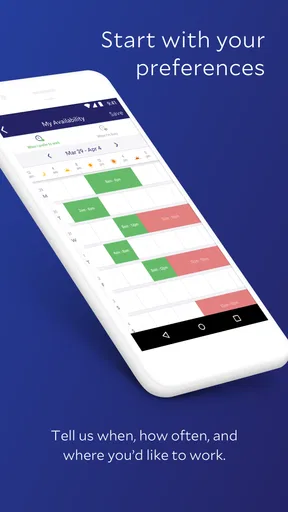
- Customizable scheduling options available.
- Real-time communication tools included.
- Efficient employee time tracking feature.
- Supports integration with other HR systems.
Cons
- Limited offline functionality available.
- Occasional sync issues reported.
- Requires frequent updates for stability.
- Notifications can be overwhelming at times.
- Limited reporting features for analytics.
FAQs for Legion Workforce Engagement
What is Legion Workforce Engagement used for?
Legion Workforce Engagement is designed to optimize workforce management by automating labor scheduling, time tracking, and employee engagement. It helps businesses streamline operations and improve productivity by ensuring the right people are in the right place at the right time, based on demand forecasts and employee preferences.
Is Legion Workforce Engagement compatible with both Android and iOS devices?
Yes, Legion Workforce Engagement is available on both Android and iOS platforms. Users can download the app from the Google Play Store or the Apple App Store, making it accessible for a wide range of smartphones and tablets. This compatibility ensures that employees and managers can stay connected and manage schedules on the go.
How secure is my data in Legion Workforce Engagement?
Legion Workforce Engagement takes data security seriously. The app employs industry-standard encryption to protect sensitive information and ensure that personal and organizational data remain confidential. Users can trust that their data is safeguarded against unauthorized access, providing peace of mind while using the app.
Can employees swap shifts using Legion Workforce Engagement?
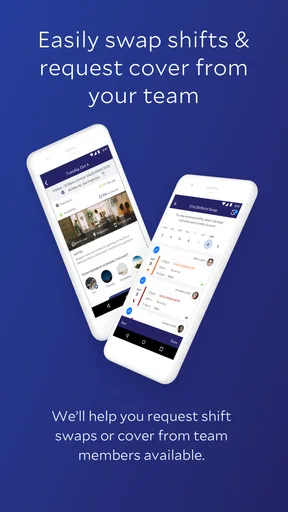
Yes, employees can easily swap shifts using Legion Workforce Engagement. The app facilitates seamless communication between team members, allowing them to request and approve shift changes directly within the platform. This feature helps enhance flexibility and employee satisfaction by accommodating personal preferences and needs.
Does Legion Workforce Engagement offer customer support?
Legion Workforce Engagement provides customer support to help users with any issues or questions they may encounter. Support is available through various channels, including email, chat, and phone, ensuring that users can receive timely assistance. Additionally, the app offers a comprehensive help center with resources and guides for self-service support.


